Our customer support is available 24/7:


How To Find Your Employee Id Number: A 2026 Guide

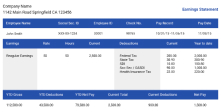
Your employee ID number is usually printed right on your pay stub. Look near your name and pay period. It's a spot most people simply overlook. If you've checked your stub and still can't spot it, don't worry. It's not lost. It's probably hiding under a different label, or sitting in your company's HR portal instead.
Below, we'll cover how to find your employee ID number in every usual spot (your pay stub, your HR or payroll portal, your badge, and the email you got when you were hired), how it compares to your Social Security number and your employer's EIN, and what to do if you've already left the job. Need to make your own pay stub instead? Our paystub generator can put one together in minutes.
Key Takeaways
- Check your latest pay stub first. It's usually near your name, sometimes labeled "Emp ID," "EMPLID," or "File #" instead of "employee ID."
- There's no public database for looking up an employee ID number. It only exists inside your own employer's systems.
- Your W-2 doesn't have a dedicated box for it. Box d ("Control number") is sometimes used, but not always.
- Workday and ADP both show it on your profile, though the exact menu name depends on your employer's setup.
- Left the company? An old pay stub, a past W-2, or your onboarding email may still have it.
- What Is an Employee ID Number?
- Where to Find Your Employee ID Number
- Employee ID vs. Social Security Number vs. EIN
- Employee ID Examples and Formats
- Why Employers Use Employee IDs
- Is There an Employee ID Number Search?
- Is Your Employee ID Number on a W-2?
- How to Find Your Employee ID Number After You've Left the Company
What Is an Employee ID Number?
An employee ID number is a unique code your employer assigns you. It identifies you inside their own payroll and HR systems. It is not issued by the government. And it is separate from your Social Security number or your company's EIN. Its job is simple: keep your pay, schedule, and records tied to you, the same way a pay stub keeps the rest of your pay details straight.
Employers use this number instead of something more sensitive, like your Social Security number. You might see it called an employee number, an associate ID, or a staff ID, depending on where you work. The label changes, but the idea stays the same. It's one internal number that follows you through payroll, scheduling, and HR software. Nobody has to hand around your SSN just to pull up a schedule or a paycheck.
Where to Find Your Employee ID Number

Start with your pay stub, physical or digital. Most payroll systems print your employee ID in the same block as your name and address. Look near the top of the stub, close to your pay period and pay date. It won't always say "employee ID" in plain letters, though. Here's what else to look for.
| Label You Might See | What It Usually Means |
|---|---|
| Emp ID | Your employee ID number |
| EMPLID | Employee ID, common in state and university payroll systems |
| Employee # | Employee ID, written as a shorter number |
| File # | Employee ID, sometimes used by payroll providers instead |
| Associate ID | Employee ID, common at large retailers |
One quick warning: your check number, advice number, or department code are not the same thing. They sit nearby on the stub, but they track the payment or your work unit, not you as a person.
No luck on the stub? Try your HR or payroll self-service portal next. Log in and check your own profile page. It usually sits near your job title or start date, not under general account settings.
Finding Your Workday Employee ID
If your company runs Workday, look at your worker profile. It often shows up in the same area as your job details, or on a "View Profile" summary screen. The exact label and placement shift by employer, since each company sets up Workday a bit differently. If you don't spot it right away, try the profile's job or personal details tabs before giving up.
Finding It in ADP or Another Payroll Portal
In ADP Workforce Now, employees often find it under Myself, then My Information, then Profile or Work Info. Other payroll portals organize things a little differently. But the pattern holds: check your own profile page, not the settings menu.
Still no luck? Check your employee badge or access card next. That's another common spot, especially if your workplace uses ID cards for building or system access. New on the job? Check the offer letter or onboarding email your employer sent before day one. Many companies send login details and your ID together.
When all else fails, just ask HR or payroll directly. They can find your employee ID number in their system in a couple of minutes. It's a completely normal question to ask.
Employee ID vs. Social Security Number vs. EIN
Once you find your employee ID number, it's easy to mix it up with the other long numbers printed nearby. Here's how the three compare.
| Employee ID | Social Security Number (SSN) | EIN | |
|---|---|---|---|
| Who issues it | Your employer | Social Security Administration | IRS |
| Format | Usually 4-8 digits or a short code | Nine digits | Nine digits |
| Where it appears | Near your name on your pay stub | Often masked on stubs; full number on tax forms | Employer section of your pay stub or W-2 |
| Sensitivity | Low. Internal to one employer | Very high. Core piece of your identity | Moderate. Identifies the business, not you |
Your SSN is a nine-digit number, and so is your employer's EIN. But they're not interchangeable, and neither one is your employee ID. Your SSN belongs to you for life. It matters for taxes and benefits. Your employer's EIN identifies the business itself, not you. Want to know more about that one? See where to find your employer's EIN on a pay stub.
Employee ID Examples and Formats

The first time you find your employee ID number, it might not look like what you expected. There's no legal standard here. Formats vary a lot from one employer to the next. Small businesses often keep it simple: numbers in hiring order, like 1001, 1002, and 1003. Larger companies sometimes add a department or location code in front of the number instead.
A few sample patterns you might see (these aren't real IDs, just examples):
- 104582
- EMP-4782
- SLS-0215
- 2026-0147
How Long Is an Employee ID Number?
There is no set length. Many employee ID numbers run 4 to 8 digits. Some companies use short codes that mix letters and numbers instead, like a department prefix plus a number. The exact length and format depend on your employer's payroll setup.
Why Employers Use Employee IDs
An employee ID number solves a simple problem for your employer: names alone aren't unique. Two coworkers named Chris Martinez can work in the same building. Payroll needs a reliable way to tell them apart, without mixing up Social Security numbers or handing out duplicate employee numbers by mistake.
That single number also keeps things connected across systems. The same ID on your pay stub often ties your timesheet, your schedule, and your benefits enrollment together. That way, a payroll department can pull an accurate record without cross-referencing three different spreadsheets by name. For hourly workers, that same number often feeds time tracking too, so clock-ins and pay calculations line up with the right person and leave a clean audit trail.
Running a small business yourself, or creating pay stubs for your own team? Keep this part simple. Many small employers just assign sequential numbers as people are hired. Your first employee gets one number, your second gets the next, and so on. There's no need for anything elaborate at a small scale. Pick a system, write it down, and put each employee's ID in the same spot on every pay stub you generate.
Is There an Employee ID Number Search?
No. There is no public database where you can search for an employee ID number. These codes are internal to each employer. Can't find yours on a pay stub or badge? Your fastest fix is checking your HR or payroll self-service portal, or simply asking HR directly.
Why isn't there one? That's by design. These numbers exist to organize one company's internal records, not to be looked up by outsiders, so there's nothing public to search the way there is for a business's EIN. Be careful with any site that says it can find your employee ID number for you. It has no access to your employer's records, so at best it's useless, and at worst it's just collecting your personal details.
Is Your Employee ID Number on a W-2?
Not officially. Per the IRS General Instructions for Forms W-2 and W-3, Box a holds your Social Security number. Box b holds your employer's EIN. Box d is labeled "Control number," which employers may use for an internal employee ID, but they don't have to. Many leave it blank.
That makes Box d the most likely place to find your employee ID number on a W-2, and only if your employer chose to use it that way. The IRS General Instructions for Forms W-2 and W-3 simply say employers may use Box d to identify individual forms and don't have to. So if your W-2's Box d is blank, that's completely normal. It just means your employer's payroll system doesn't use it that way. If you're also trying to make sense of the wage boxes nearby, here's how to calculate W-2 wages from a pay stub.
How to Find Your Employee ID Number After You've Left the Company
Check any old pay stub you still have. Or look in Box d of a past W-2, in case your former employer used it that way. Your original offer letter or onboarding email is another common spot. None of those work? Contact your former employer's HR or payroll department directly.
Many employers hold onto payroll records for a while after someone leaves. A quick email to your old HR or payroll contact is often enough to get the number, especially if you need it for a reference check or a form from a new employer. Chasing down an old W-2 at the same time? Here's how to get a copy of your W-2 online if your old employer offers a portal.
You Might Also Like
- Pay Stub Abbreviations: Everything You Need to Know
- How to Access Your Pay Stubs
- Year-to-Date Earnings on a Pay Stub
- Multiple W-2 Forms From Different Employers
- How to Get a W-2 From a Previous Employer
Conclusion
So, when you need to find your employee ID number, check one of a handful of spots: your pay stub, your HR or payroll portal, your badge, or the onboarding email you got when you started. It's rarely actually lost. It's usually just labeled differently than you expect, whether that's "Emp ID," "EMPLID," or "Employee #."
If you run payroll for a small team yourself, and want your employees' IDs, pay periods, and earnings laid out clearly every time, our paystub generator makes it simple to create accurate pay stubs in minutes.